PHP2Shell: How to Check and Fix the Critical PHP Bug on Your Website (DIY Guide)
A 14-year-old PHP bug, found with help from AI, lets attackers take over unpatched servers. Here is a plain-English, step-by-step guide to checking your PHP version and fixing it on GoDaddy, Hostinger, Bluehost, SiteGround, Namecheap, Cloudways, AWS, DigitalOcean and your own server.
On 21 October 2026 the PHP team released an emergency security update. It fixes two serious bugs that the press has named PHP2Shell. If your website runs on PHP (and WordPress, Joomla, Drupal, Magento and Laravel sites all do), this affects you. The good news: for most people the fix takes about 10 minutes. This guide shows you how to check, and how to fix it on the most popular hosts.
- Find your PHP version. (Section 4)
- Compare it with the fixed versions: 8.5.12, 8.4.27, 8.3.36 or 8.2.35 (or newer). Anything lower is not safe unless your host says it was patched another way.
- Update PHP in your hosting panel, or ask your host to do it. Managed WordPress hosts usually already did it for you. (Section 5)
- Restart PHP if you run your own server. (Section 6)
- Check for signs of a break-in and change your passwords and keys. (Section 8)
- What happened
- How AI helped find a 14-year-old bug
- How it affects websites
- Step 1: Check your PHP version
- Step 2: Fix it on your host (GoDaddy, Hostinger, Bluehost, SiteGround, Namecheap, Cloudways, AWS, DigitalOcean, your own server)
- Step 3: Restart and confirm
- If you cannot update right now
- Step 4: Check if you were hit
- Quick questions
- Need urgent help?
1. What happened
Two bugs were found deep inside PHP itself, not in WordPress or any plugin. They are tracked as CVE-2026-109618 and CVE-2026-109619. Both are rated 9.2 out of 10 for severity. (Some early reports said 10.0, but the PHP Foundation says that score was wrong.)
| Date | What happened |
|---|---|
| Aug 2026 | Researchers at Calif, and later Wiz and OpenAI, independently find the bugs using AI tools and quietly tell the PHP team. |
| 17 Oct | Amazon says it saw an attack attempt on its test servers, four days before the public announcement. |
| 20 Oct | The bug numbers leak and PHP announces that a security release is coming. |
| 21 Oct | PHP publishes the fix (released a day earlier than first planned). Attacks start within minutes, according to Cloudflare and Amazon. |
| 22–23 Oct | Hosting companies roll out patches. Some are done, some are still working. |
Which PHP versions are safe?
| Your PHP branch | Safe from this version |
|---|---|
| 8.5 | 8.5.12 or newer |
| 8.4 | 8.4.27 or newer |
| 8.3 | 8.3.36 or newer |
| 8.2 | 8.2.35 or newer |
| 7.4 – 8.1 | No official release. Only small fixes (“backports”) from the PHP security team, and some hosts and Linux vendors add them. Plan to upgrade. |
| 7.3 and older | Ended its life. No fix from the PHP project. Upgrade. |
The earliest affected code goes back to PHP 5.4, which is why so many old servers are exposed.
2. How AI helped find a 14-year-old bug
Here is what the news reports say. (I link all of them at the bottom.)
- The bug is old. OpenAI co-founder Greg Brockman said it has been in PHP for 14 years. A smaller version of the problem was spotted in 2024 but was not seen as important back then (Fortune).
- Humans suspected something, but could not prove it. A reporter quoted by CBS News said people knew “something weird was going on” but nobody could write a working attack. An AI can do that slow, boring, detailed work much faster than a person.
- Several teams found it separately. The security firm Calif found the first problem on 1 August using OpenAI’s GPT-5.6 Sol model. Wiz, a Google-owned security company, found it on 19 August using several AI models. OpenAI found extra pieces and then led a group with the PHP Foundation, Wiz, Calif, Cloudflare and others to prepare the fix (Fortune).
- People still steered the work. Calif warns that no AI finds every bug from a simple question. Knowing where to look still mattered.
What this means for you: the same AI tools that helped the defenders can help attackers too. OpenAI itself warned about this. Old, forgotten bugs can now be found and turned into attacks much faster, so patching quickly matters more than it used to.
3. How it affects websites
Both bugs are “use-after-free” bugs. Simply put: PHP hands some memory back, but something still points at it, and a later visitor’s request can end up using that memory. Researchers say the trigger is a file-upload style request (multipart/form-data). PHP reads that before your website code runs, so the attacker does not need a password.
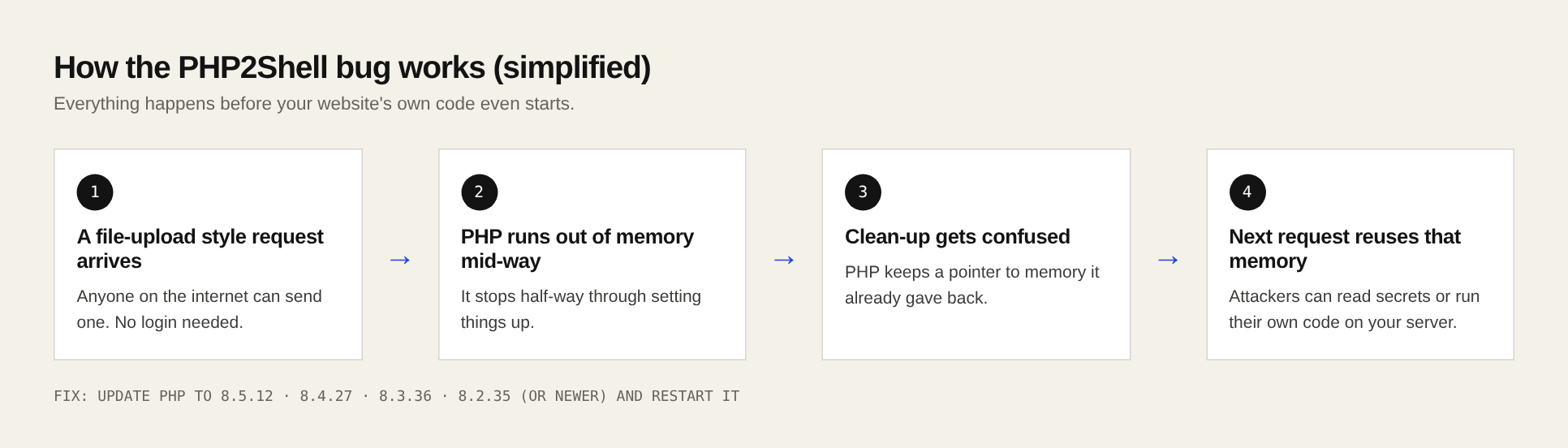
What an attacker could do
- Read secrets from memory (one bug can leak memory, similar to the famous Heartbleed bug): passwords, login sessions, API keys.
- Run their own code on your server (remote code execution). From there they can steal customer data, change your pages, install malware, or take the site offline.
Who is affected?
- Any site that runs PHP and has not been patched. PHP says every way of serving web requests is at risk: PHP-FPM, Apache with mod_php, php-cgi, FrankenPHP and LiteSpeed. Apache with mod_php is the highest risk.
- Updating WordPress, or your plugins, does not fix this. The problem is in PHP on the server. WordPress.org has said no WordPress update is needed.
- Scanners estimate over a million servers are exposed. One estimate says 22.6 million instances (Palo Alto Networks, via Fortune).
Being unpatched does not mean you were hacked. But attacks are already happening, and attackers scan the whole internet. The FBI and WordPress.org say that if you cannot patch, take the site offline until you can.
4. Step 1: Check your PHP version
Pick the method that matches how you use your site. It takes two minutes.
Method A: WordPress dashboard (easiest)
- Log in to
/wp-admin. - Go to Tools → Site Health.
- Click the Info tab.
- Open the Server section. Look for the line PHP version.
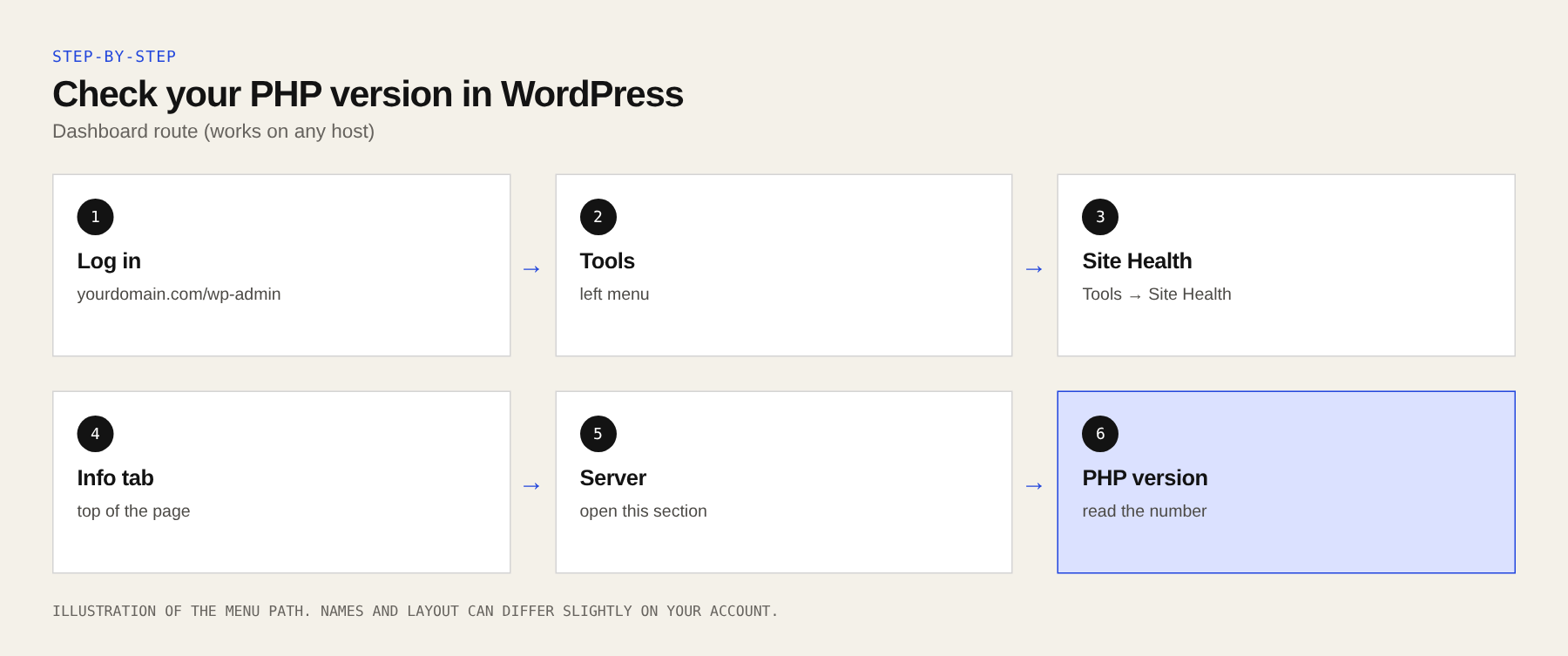
Method B: Your hosting control panel
Almost every host shows the PHP version for each site in its panel. Section 5 tells you where, for each host.
Method C: From the command line (if you manage a server)
Connect with SSH and run:
php -v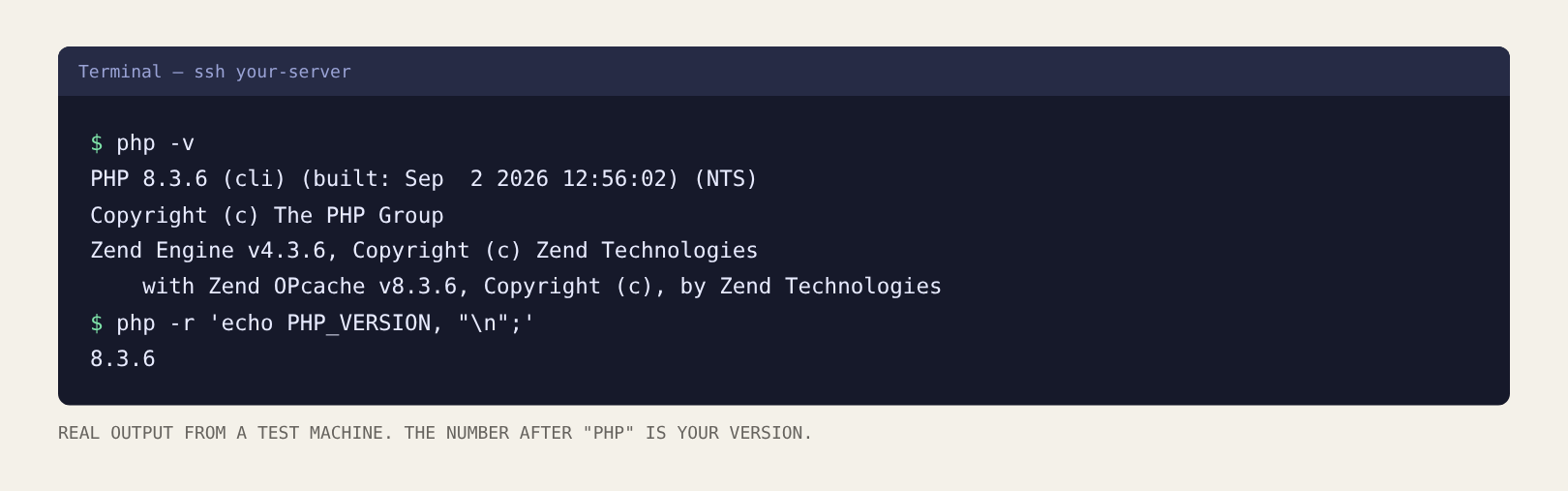
One catch: the command line can use a different PHP than your website. If your server has several PHP versions, also check which one your site uses (for example, the php8.2-fpm service, or the version chosen in your panel).
How to read the result
- Your version is equal to or higher than the fixed one for your branch (for example 8.3.36 or 8.3.40)? Good.
- Lower (for example 8.3.30)? Update now.
- 8.1 or older? Update to a newer branch. These do not get official fixes.
Linux distributions such as Debian and Ubuntu often add a security fix to an older-looking version number without changing it. So a “low” number does not always mean unpatched, and you cannot always tell from the number alone. If you use packages from your Linux distribution, check the package changelog (see the Debian section below) or ask your host to confirm in writing that CVE-2026-109618 and CVE-2026-109619 are fixed for your site.
Do not download or run “PHP2Shell checker” or exploit scripts from random websites or social media. Public exploit code is circulating, and unverified code can contain malware. Use the simple checks in this guide.
5. Step 2: Fix it on your host
Find your hosting company below. The status notes are from public host statements and trackers on 21–22 October 2026. They change fast, so treat them as a guide and confirm with your host.
Which version should I choose? Pick the newest PHP version that your website supports. PHP 8.3 or 8.4 is a good target. Do not pick a version lower than your current one. If your site is on PHP 8.1 or older, this is also the time to upgrade: older themes and plugins can break, so take a full backup first, switch, then click through your key pages and forms.
Menu names in control panels change from time to time. If a name below does not match what you see, search the panel for “PHP” and use your host’s help pages.
Managed WordPress hosting (WordPress.com, WP Engine, Kinsta, Pressable, Rocket.net)
Host handles itThese companies manage PHP for you. As of 22 October, WordPress.com and Pressable said sites were already protected. WP Engine and Kinsta said they used temporary blocking rules first and then finished patching. You usually do nothing.
- Check your PHP version using Method A above.
- Look at your host’s status page or security notice.
- If you are unsure, open a support chat and ask: “Has CVE-2026-109618 and CVE-2026-109619 been fixed on my site’s server? Has PHP been restarted?”
GoDaddy
Depends on your plan- Managed WordPress: GoDaddy says it is fully patched. Nothing to do.
- Web Hosting (cPanel) and Windows Hosting: as of 22 October GoDaddy was still patching and used temporary protections. GoDaddy also told customers to assume they are affected until updated and to move off PHP 8.1 or older.
- VPS and dedicated servers: you manage the server. Use the “your own server” section below.
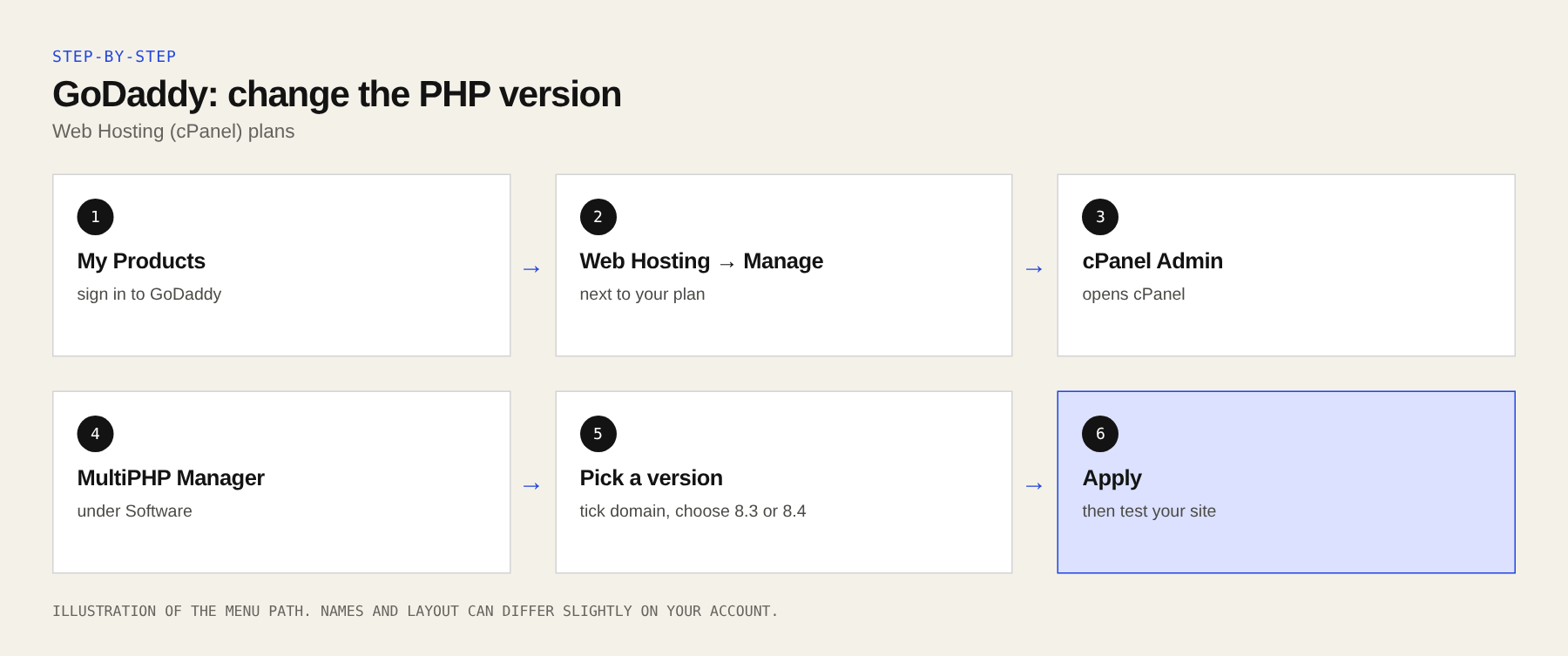
Steps for Web Hosting (cPanel):
- Sign in to your GoDaddy account and open My Products.
- Next to Web Hosting, click Manage, then open cPanel Admin.
- In cPanel, under Software, open MultiPHP Manager (some accounts show Select PHP Version instead).
- Tick your domain. In the PHP version list choose the newest version your site supports (8.3 or 8.4 is a good target). Click Apply.
- Open your website and test it. Then ask GoDaddy support to confirm the security fix is on your server.
Hostinger
Patched on shared, cloud and cPanel plansHostinger said it blocked known attack attempts first and then patched its Web, Cloud and cPanel hosting. VPS plans are not included in that statement, so VPS owners must update themselves.
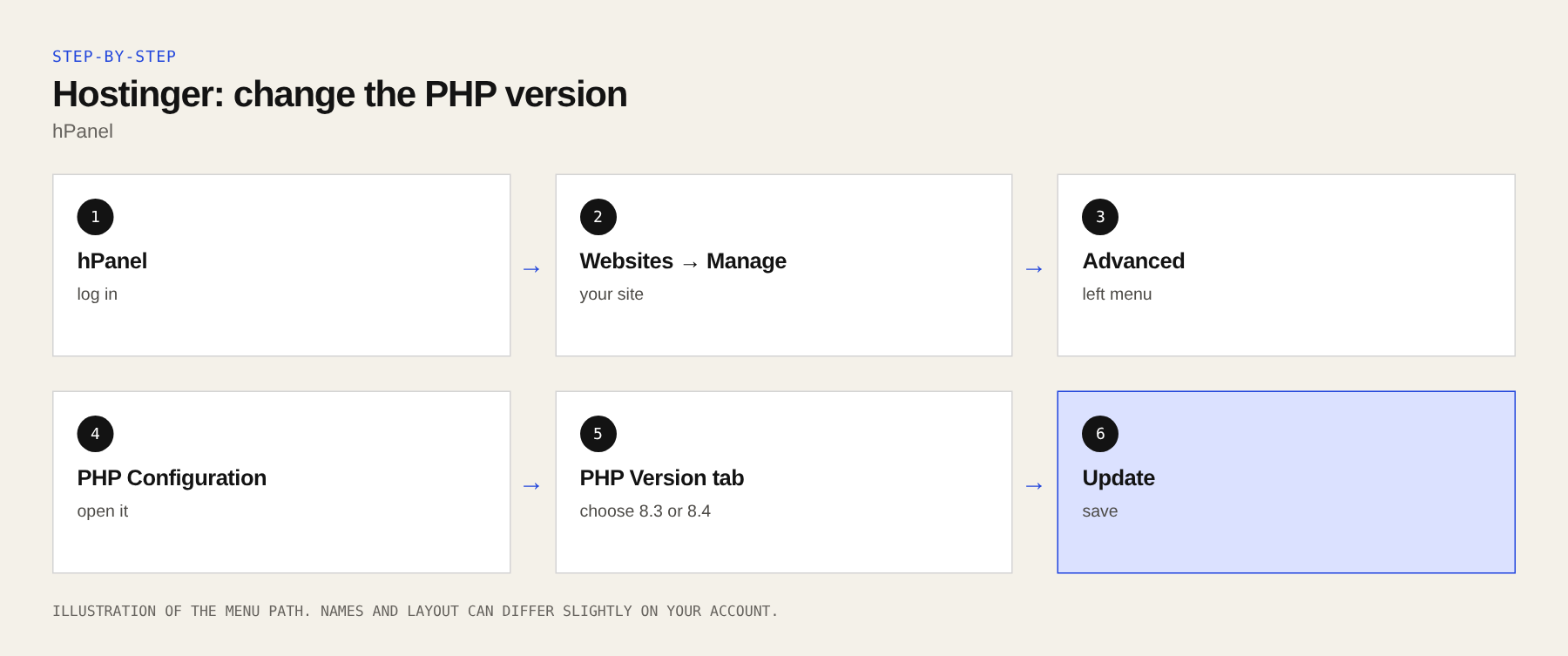
- Log in to hPanel.
- Go to Websites and click Manage next to your site.
- In the left menu open Advanced → PHP Configuration.
- On the PHP Version tab pick a current version (8.3 or 8.4) and click Update.
Bluehost
Mostly patched, rest in progressBluehost said most servers were patched and the rest were in progress. It warned that you might see limits on upload file sizes in the meantime.
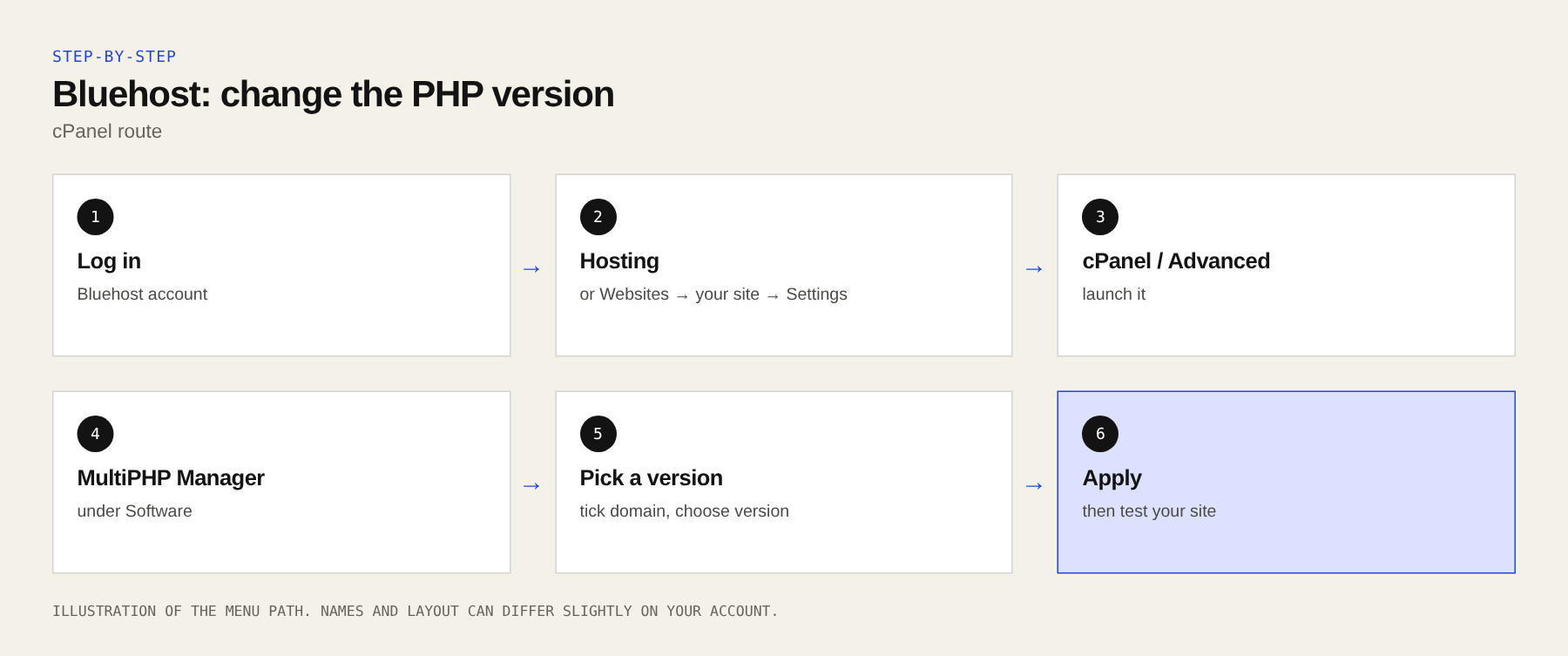
- Log in to your Bluehost account.
- Open Hosting (or Websites → your site → Settings on newer accounts) and launch cPanel / Advanced.
- Open MultiPHP Manager, tick your domain, choose a current PHP version and click Apply.
- If your plan has no PHP option, contact Bluehost support and ask for written confirmation that your server is patched.
SiteGround
Protection added, not a full patch (as of 21 Oct)SiteGround said it turned off the affected functions on all supported PHP versions across its servers. That is a mitigation, not a patched PHP. Check their security notice for the latest.
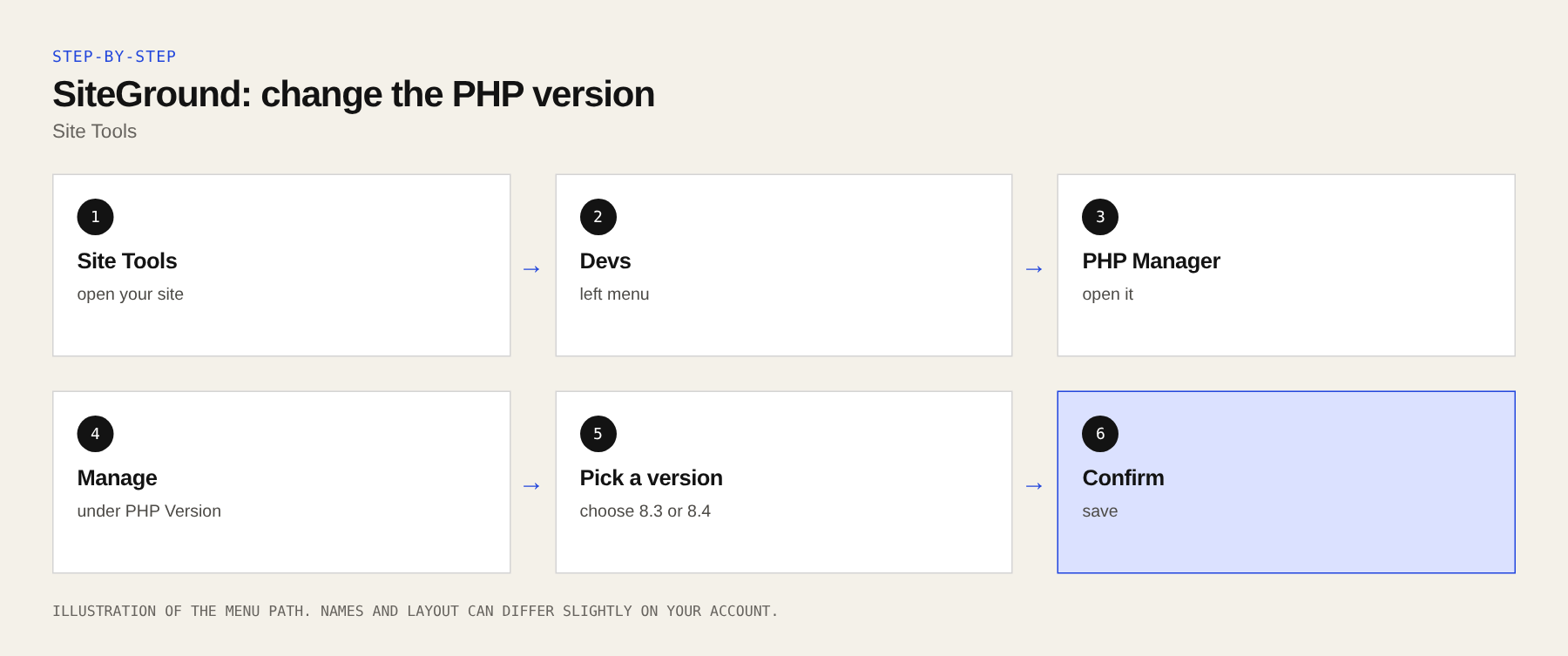
- Log in and open Site Tools for your site.
- Go to Devs → PHP Manager.
- Under PHP Version choose Manage, pick a current version and confirm.
Namecheap
Nearly finished on shared hostingNamecheap said its patching was almost finished and published a list of servers still waiting. VPS and dedicated server customers must update PHP themselves right away.
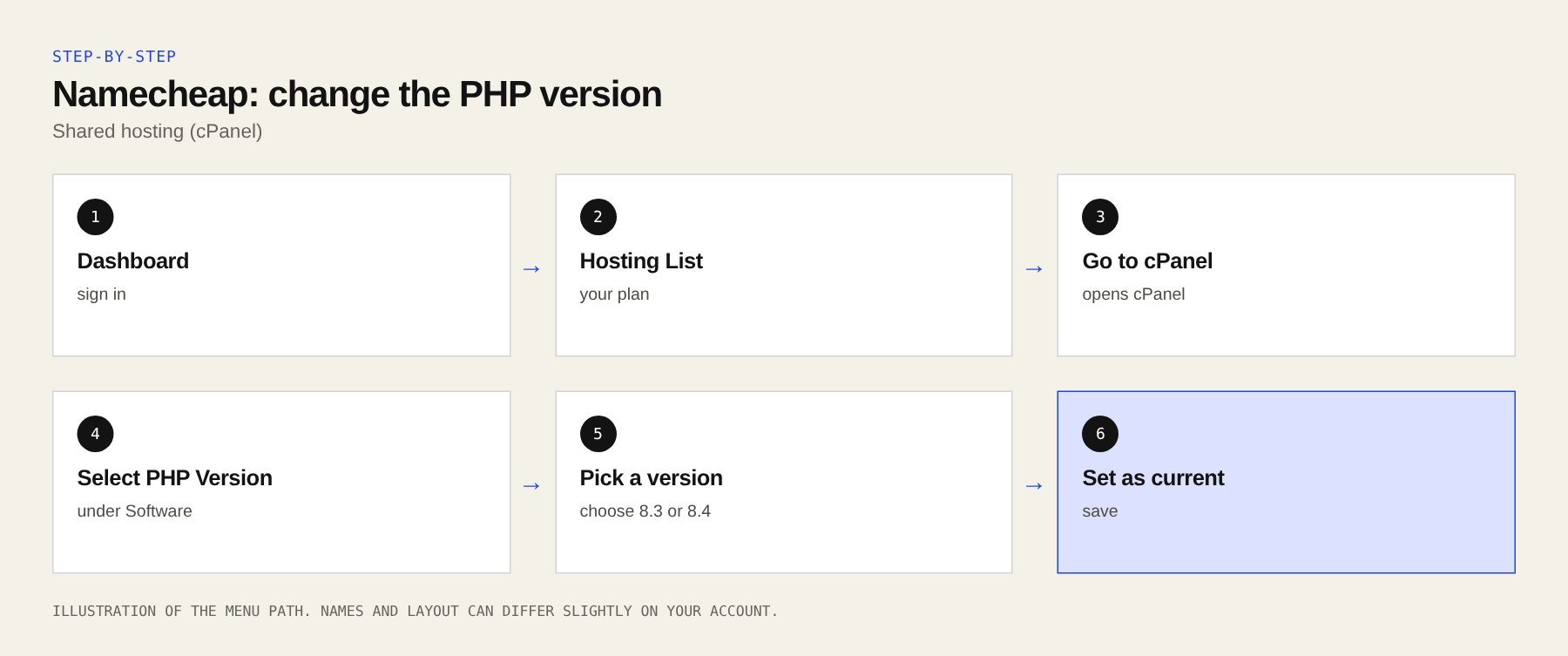
- Open your Dashboard → Hosting List → Go to cPanel.
- Under Software open Select PHP Version (or MultiPHP Manager).
- Choose a current version and click Set as current (or Apply).
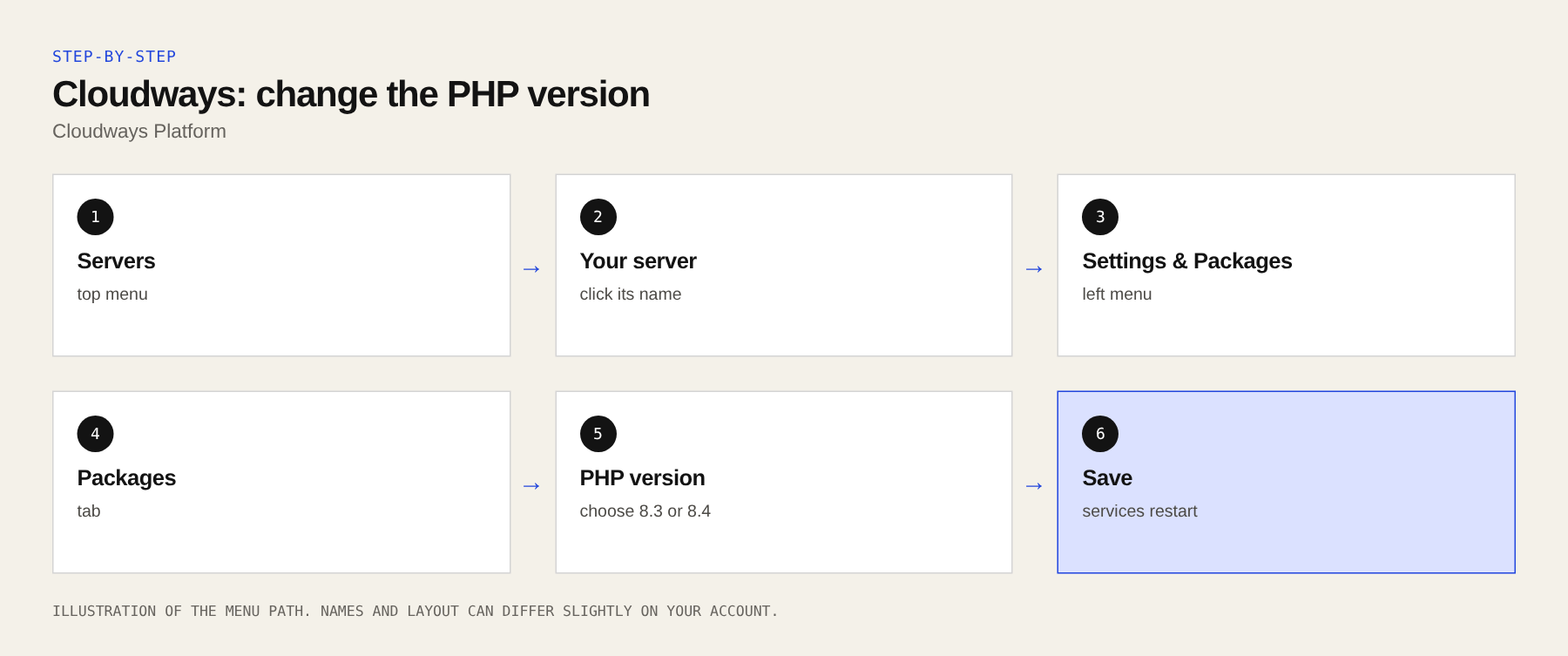
Cloudways
Autonomous patched; Flexible rolling outCloudways said its Autonomous plans were patched and Flexible plans were being patched (expected by the morning of 22 October). Confirm yours with support.
- Log in and open Servers, then click your server.
- Go to Settings & Packages → Packages.
- Next to PHP choose a current version and save. Cloudways will restart the services for you.
HostGator and other cPanel hosts (InMotion, DreamHost, Liquid Web, 20i and similar)
Check your host’s noticeI could not find a clear public statement from HostGator. DreamHost and Liquid Web were still rolling out patches on 22 October, and 20i said it finished (including fixes for older PHP versions). If your host uses cPanel, the steps are the same everywhere:
- Log in to cPanel.
- Open MultiPHP Manager (or Select PHP Version).
- Choose your domain, pick a current PHP version, then Apply.
- Open a support ticket and ask for written confirmation that your server has the 21 October fix.
Amazon Web Services (EC2, Lightsail, Elastic Beanstalk)
You usually must update it yourself- EC2 and Lightsail: these are your own servers, so patching is your job. One tracker notes a Lightsail instance cannot be updated in place; if yours was set up from a pre-built image, plan to rebuild from a patched image or follow AWS’s own notice.
- Elastic Beanstalk: AWS patched its PHP platform in version 4.13.12. Update your environment to that version or newer.
- Amazon Linux 2: a secondary source says there is no fix planned. Move to Amazon Linux 2023 or another supported system.
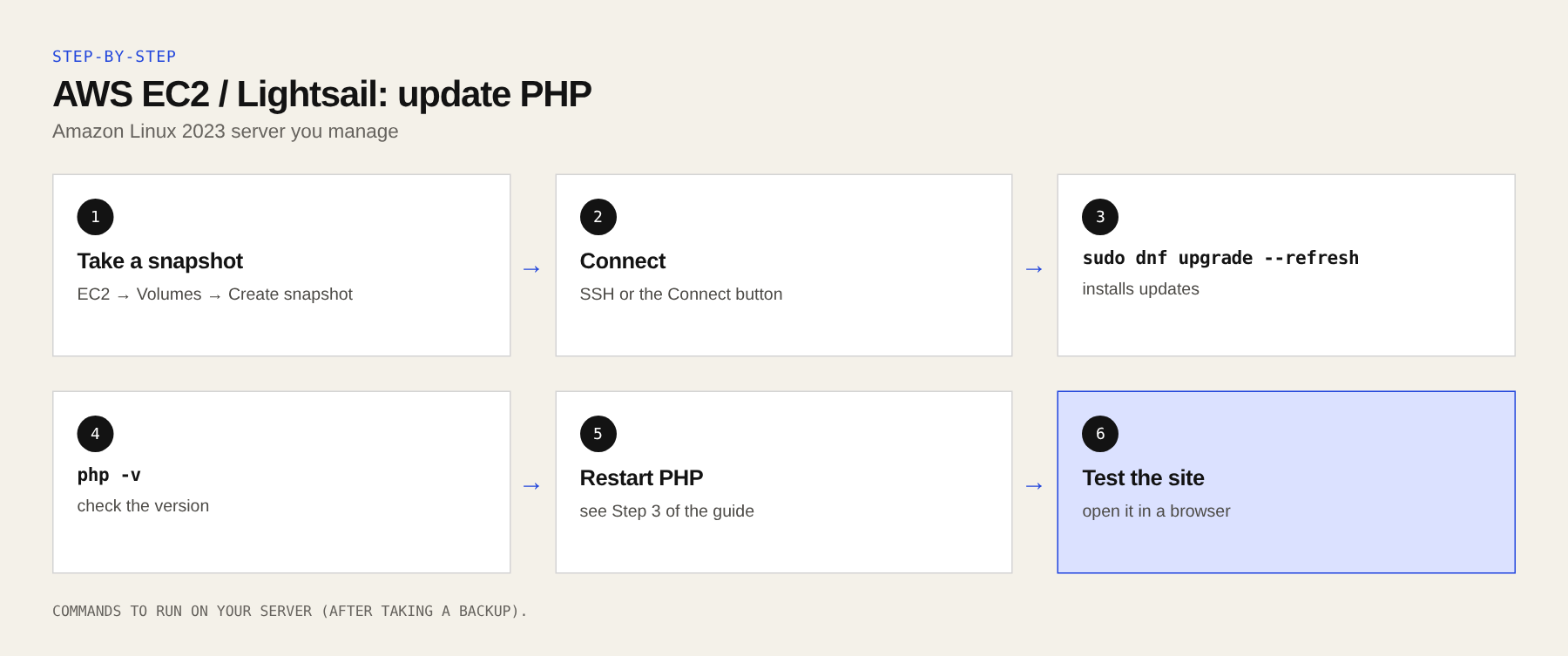
EC2 or Lightsail steps (Amazon Linux 2023):
- Take a snapshot first. In the console: EC2 → Volumes → Create snapshot (Lightsail: Snapshots tab).
- Connect with SSH (or the browser-based Connect button).
- Run the update and look for PHP packages in the list:
sudo dnf upgrade --refresh
php -v- Restart PHP so the new version is used (see Step 3).
Elastic Beanstalk steps: open the Elastic Beanstalk console → Environments → your environment → Platform → Change version, choose the newest PHP platform version and apply it.
DigitalOcean (Droplets and App Platform)
Droplets: update yourself- Droplets (including existing 1-Click apps): you manage the server. Follow the “your own server” steps below.
- App Platform: the buildpack was patched. Just redeploy your app: open your app, then Actions → Force Rebuild and Deploy.
Laravel Forge
Update PHP from the dashboard- Open your server in Forge.
- Click the Runtime tab, then PHP.
- Open the menu beside each installed PHP version and click Update. Forge does not do this automatically.
Your own server: Debian or Ubuntu (VPS, droplet, EC2)
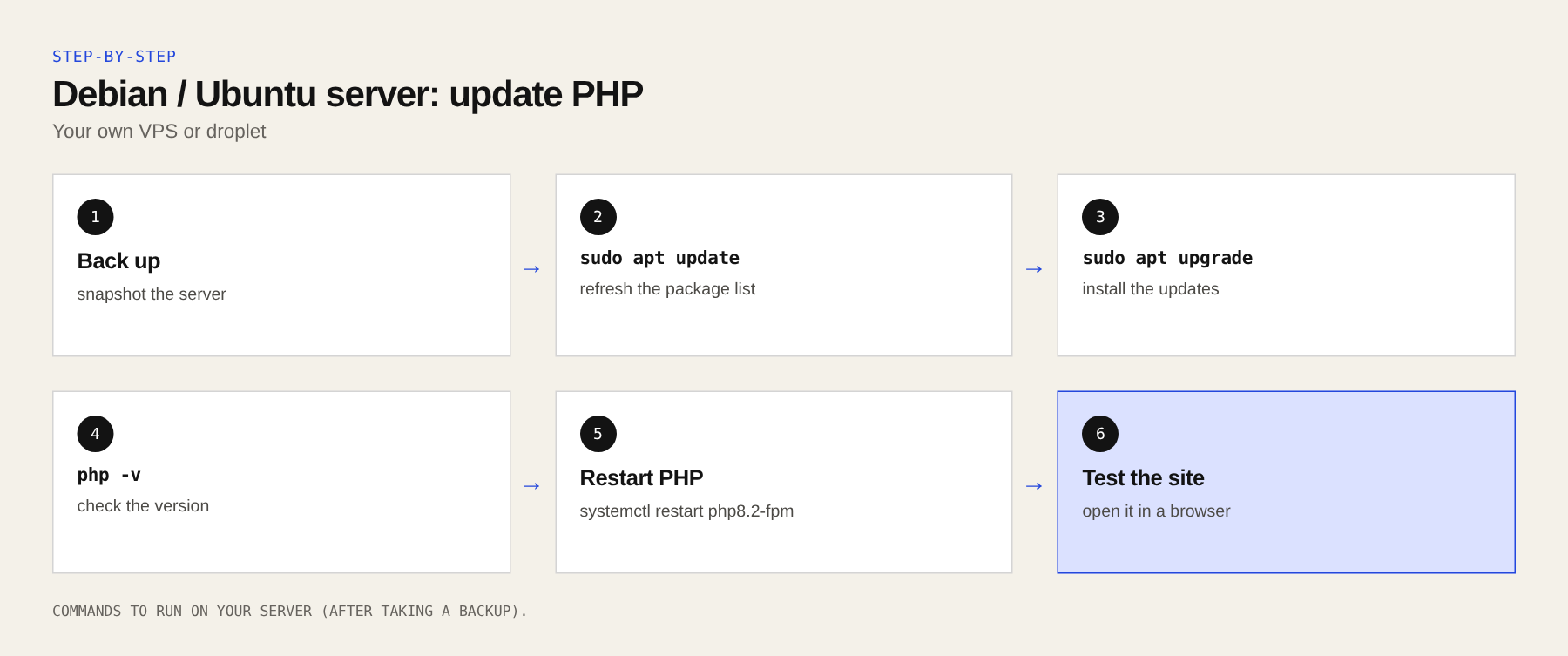
You must update and restart itThis is the most hands-on case. You need SSH access and sudo. Take a backup or snapshot first.
- Update the package list and see what PHP packages are waiting:
sudo apt update
apt list --upgradable 2>/dev/null | grep -i php- Install the updates:
sudo apt upgrade- Check that your system’s fix is included. On Debian 12 (bookworm), the Debian security archive lists PHP 8.2 as
8.2.35-1~deb12u1, which matches the upstream fixed version. Then confirm the fix is in the changelog (changephp8.2-commonto match your version):
php -v
zgrep -m2 -i 'CVE-2026-109618\|CVE-2026-109619' /usr/share/doc/php8.2-common/changelog.Debian.gz
If the second command prints nothing, your system may not have the fix yet. Check the Debian security tracker for CVE-2026-109618 and update again later. If you use the third-party “sury.org” PHP packages, you can instead install the new upstream versions (8.3.36, 8.4.27 and so on).
- Restart PHP. Updating alone is not enough. See Step 3.
Using Docker? Updating the host does nothing for containers. Pull a new PHP image that is at or above the fixed version, rebuild your image, and redeploy.
Using Cloudflare? (an extra layer, not a fix)
Helpful, but not enough on its ownCloudflare added firewall (WAF) rules against known attack methods, on all plans including Free. On paid plans, open Security → WAF → Managed rules and make sure the rules are set to Block, not just Log. Cloudflare itself calls this a stopgap. It only helps for traffic that goes through Cloudflare, and an attacker who finds your real server address can bypass it. Still update PHP.
6. Step 3: Restart and confirm
On shared and managed hosting, changing the PHP version in the panel does this for you.
On your own server, PHP that is already running keeps using the old code until you restart it:
# If you use PHP-FPM (check the exact name with: systemctl list-units | grep fpm)
sudo systemctl restart php8.2-fpm

# If you use Apache with mod_php, do a FULL restart (a 'reload' is not enough)
sudo systemctl restart apache2

# Nginx usually just needs PHP-FPM restarted, but this is safe too
sudo systemctl restart nginx
Then check again with Step 1 (WordPress Site Health or php -v) and reload your website to make sure everything still works.
7. If you cannot update right now
Updating is the only complete fix. If you truly cannot do it today:
- Ask your host. Many hosts are protecting customers at the server level while they patch. Ask for written confirmation.
- Turn on Cloudflare (free plan is fine) in front of your site to get its extra firewall rules.
- Switch off the upload-progress feature. PHP lists
session.upload_progress.enabled = 0as a temporary measure for one of the two bugs. WordPress does not use it. On many hosts you can create a file called.user.iniin your website’s main folder with this single line (it can take about 5 minutes to apply):
session.upload_progress.enabled = 0This only blocks one attack path. It does not make you safe. PHP also lists a memory-limit change for the other bug, but it can let a runaway script use all your server’s memory, so only do that if your host or server admin advises it.
The FBI and WordPress.org both say that if you cannot patch soon, it is better to take the site offline (or put up a simple maintenance page) until you can. Some agencies in the Netherlands and Finland took their sites offline as a precaution.
8. Step 4: Check if you were hit
Attacks started before the fix was public (Amazon saw one on 17 October), so after you patch, spend ten minutes checking. This is a basic check, not a full investigation.
- Look for new admin users. In WordPress go to Users and check every Administrator. Delete any you do not recognise.
- Look for recently changed files. On a server with SSH, this lists PHP files changed since 17 October (change the folder to your site’s path):
find /var/www -name '*.php' -newermt '2026-10-17' -not -path '*/cache/*' 2>/dev/null | head -50Updates you ran yourself will show up too. You are looking for strange file names or PHP files inside your uploads folder, which should hold images and documents, not code.
- Check scheduled jobs. Run
crontab -land look at WordPress’s scheduled tasks (a plugin such as WP Crontrol shows them). Remove anything you do not recognise. - Run a malware scan. A free security plugin such as Wordfence or Sucuri can scan your files.
- Change your secrets if you were exposed for any length of time, because one of the bugs can leak memory: WordPress admin passwords, database password, the keys and salts in
wp-config.php, email (SMTP) passwords, and any API keys. - Restore a clean backup from before 17 October if you find anything suspicious, and then patch before putting the site back online.
If you find a web shell or anything you do not understand, stop and get help. See the form at the bottom.
9. Quick questions
Do I need to update WordPress or my plugins?
Not for this bug. The problem is in PHP. Keep WordPress updated anyway, but it will not fix PHP2Shell.
I am on shared hosting. Do I have to do anything?
Check the version in your panel, then update PHP there or ask your host to confirm in writing that they patched it.
Is my computer or phone in danger if I visit PHP sites?
Not directly. The risk is to the website and the data stored on it. Be careful with strange emails and messages, as always.
Will this happen again?
Probably, as AI makes finding old bugs faster. The best habits: use a supported PHP version, turn on automatic updates where your host offers them, keep regular backups, and know where to change your PHP version.
I wrote this as a plain-English guide from public sources on 23 October 2026. It is general information, not a guarantee. Back up before you change anything, and check your host’s own notices.
Need urgent help?
If you are stuck, think you were hacked, or cannot update, send me a short message. Tell me your hosting company and your website address, and I will get back to you as soon as I can.
LinkedIn: /in/aarohikothariGitHub: aarohi1012
Sources
- Fortune: AI helped discover the PHP vulnerability
- CBS News: What to know about the PHP bug
- Tenable: PHP2Shell FAQ (versions, mitigations, timeline)
- Codeable: What WordPress site owners need to do
- Towards AI: How AI found the bug
- Sansec: PHP2Shell research
- ActiveSet: Host patch status tracker
- The Repository: Hosts race to protect customers
- Jason Burns: How to patch on your host
- Debian Security Tracker: php8.2